REST - Packets
We've been making requests using HTTP without going into great detail about what the details are of the transmission protocol. We will take a break from coding in this lesson to talk about it now.
HTTP is actually built on top of another protocol - TCP (Transmission Control Protocol). TCP enables data transmission, error detection, and retransmission. Say we have a request for a multi-gigabyte file. The internet is not built to send very large data packets at a time, it's built for smaller faster moving packets. To accomodate this, TCP will break a request or response into many smaller packets of some small size. To make sure the data can be reconstructed on the other end, additional information will be passed with each packet, such as a sequence number.
Let us now take a look at what a traditional TCP packet generally contains. We will define everything, however we will focus on only a few of them.
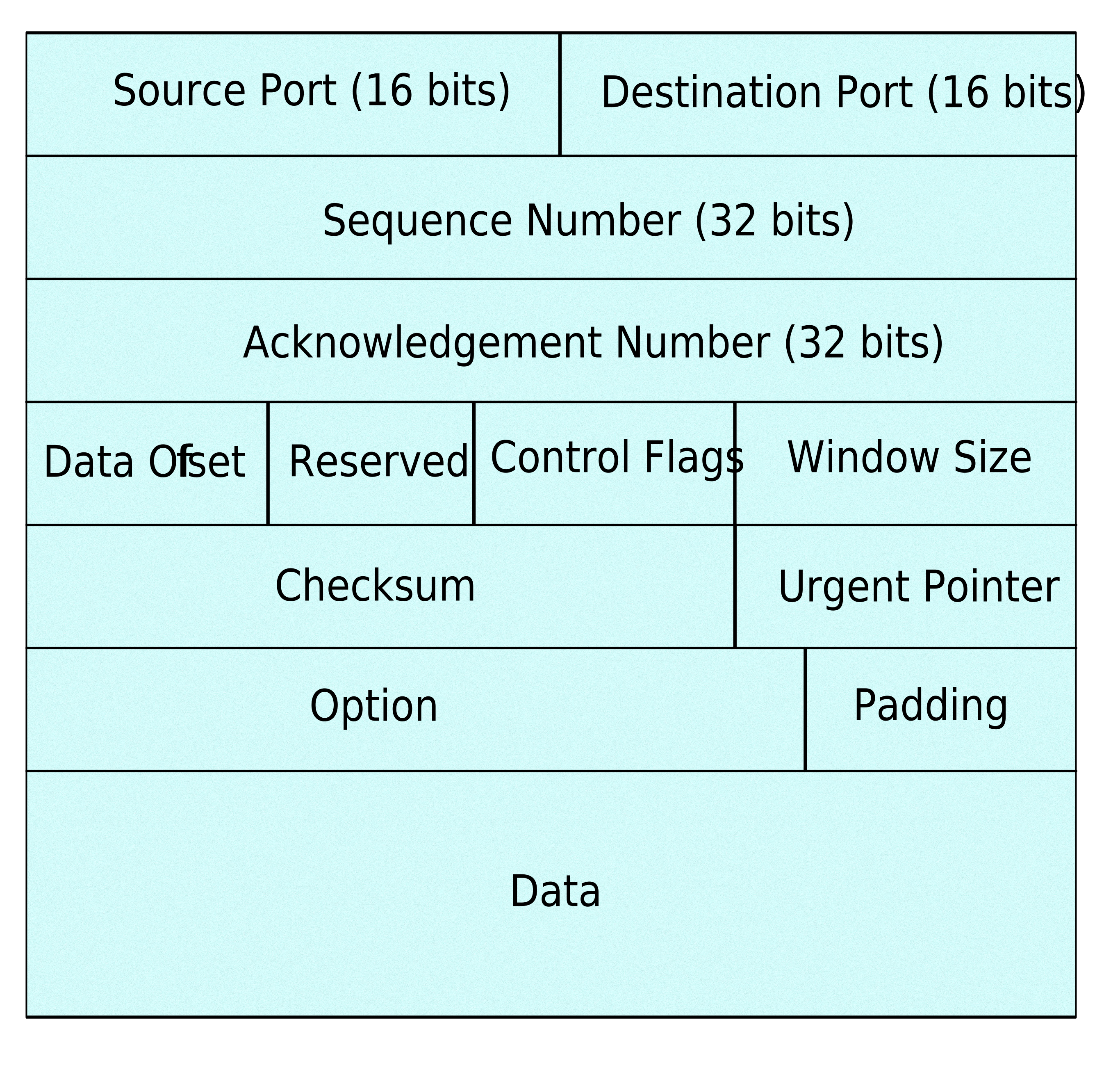
- Source and Destination Port Numbers: These are 16-bit numbers that identify the source and destination applications on the devices sending and receiving the TCP packet.
- Sequence Number: This 32-bit number represents the position of the data in the stream of bytes being transmitted. It helps in maintaining the correct order of data segments.
- Acknowledgment Number: If the ACK flag is set, this 32-bit number acknowledges receipt of data up to the specified sequence number. It acknowledges the next expected byte from the sender.
- Data Offset: This 4-bit field indicates the length of the TCP header in 32-bit words. It's used to locate the start of the data in the segment.
- Control Flags: These are single-bit flags that control various aspects of the TCP communication. They include:
- URG: Urgent data pointer field significant.
- ACK: Acknowledgment field significant.
- PSH: Push function (push data to the application).
- RST: Reset the connection.
- SYN: Synchronize sequence numbers.
- FIN: No more data from sender.
- Window Size: This 16-bit field specifies the size of the sender's receive window. It indicates the amount of data the sender is willing to receive before requiring an acknowledgment.
- Checksum: A 16-bit checksum that covers the TCP header, data, and a pseudo-header. It's used to detect errors in the packet during transmission.
- Urgent Pointer: If the URG flag is set, this 16-bit field provides an offset from the sequence number indicating the last urgent data byte.
- Options: These are optional fields that can carry additional information, such as maximum segment size, timestamp, and window scale factor.
- Data: This is the actual payload of the TCP segment, containing the application data being transmitted.
Let us cover sequence number and acknowledgement number in more detail. Because data is just a sequence of zeroes and ones, we can break a large piece of data into smaller bite size messages that can be packaged in a TCP envelope. Just like with regular mail, some packages might travel faster than others. So when the receiver gets the message, they will read the sequence number to know what order the data should be reassembled in.
The sender is curious to know if the receiver actually received their message. Part of the validation process is the receiver acknowledging that it received the correct message. So the receiver will message back to the sender a value that is one increment more than the sequence number. For example if the message the receiver received was 405, then it would send a message back to the sender with an acknowledge number of 406.
These work in tandem to ensure messages are sent, received and acknowledged in the correct order.